



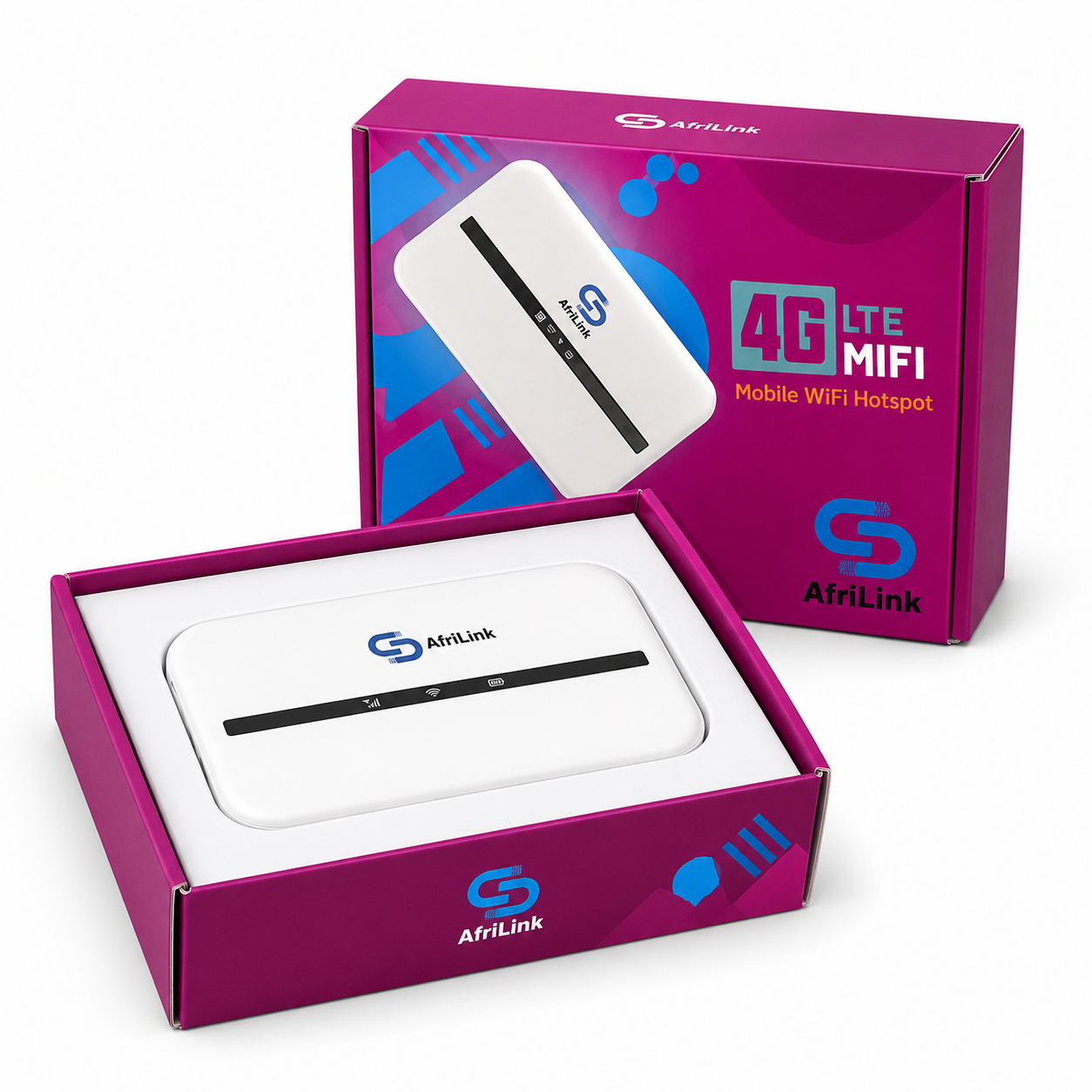

AFRILINK DL100 PORTABLE MIFI
Original price was: ₦28,000.00.₦25,680.00Current price is: ₦25,680.00.
AFRILINK DL100 PORTABLE MIFI
Connectivity: Uses a standard SIM card to connect to 4G LTE/3G/2G networks, making it highly portable for travel or remote work.
Portability: It’s typically compact and lightweight, designed to fit in a pocket or bag to provide internet anywhere you go.
Sharing Capability: Allows you to create a Wi-Fi network that can be shared with multiple devices simultaneously (e.g., smartphones, laptops, tablets).
Plug-and-Play: Generally, requires no complex configuration; just insert a compatible SIM card with a data plan and power it on.
Security: Supports standard Wi-Fi security protocols like WPA/WPA2 for a secure connection.


SALE
-7%
Original price was: ₦350,000.00.₦325,000.00Current price is: ₦325,000.00.

SALE
-20%
Original price was: ₦30,000.00.₦24,075.00Current price is: ₦24,075.00.
Product details
Stay connected on the go with the Mobile Wi-Fi, a powerful 4G LTE pocket-size mobile internet hotspot router that allows you to securely connect up to 8 WIFI devices simultaneously. Whether you’re travelling, working remotely, or simply need internet access wherever you are, this compact and durable device has got you covered.
Compatible with all Networks
Supporting a wide range of networks, the Mobile Wi-Fi works seamlessly with NTEL 4G, Airtel 4G and 3G, Mtnng 4G and 3G, Glo 4G and 3G, 9mobile 4G and 3G, and Smile 4G. Please note that it does not support Spectranet and Swift networks.
Impressive Features:
1. Multifunctionality: In addition to sharing 4G network connectivity, this versatile device also offers a simple “NAS” function, allowing you to access data stored on an SD card.
2. One-Key Encryption: With support for IPv6, firewall, QoS, VLAN, and WPS “one-key encryption,” this router ensures enhanced security and privacy for your network.
3. High-Speed Connectivity: Experience lightning-fast download speeds of up to 150 Mbps and upload speeds of up to 50 Mbps, enabling you to browse, stream, and work without any lag or interruptions.
4. Sleek Design: The Mobile Wi-Fi boasts a unique pure design that exudes a fresh and elegant atmosphere, complementing your style while offering reliable performance.
Enhanced Network Experience:
1. Benefit from the impressive bandwidth capabilities of the 4G network, elevating your home internet experience beyond traditional fixed networks.
2. Covering a distance of up to meters, the Mobile Wi-Fi complies with the 802.11b/g/n standard, ensuring reliable wireless connectivity across a wide area.
Register the SIM that come with the router


SALE
-6%
Original price was: ₦270,000.00.₦255,000.00Current price is: ₦255,000.00.


SALE
-55%
Original price was: ₦10,000.00.₦4,500.00Current price is: ₦4,500.00.


Price range: ₦760,000.00 through ₦800,000.00
Apple iPhone 14 Pro factory Unlocked Excellent Condition
- This product has been professionally inspected, tested and cleaned by FLX authorized team
- Fully functional product in Like New Condition. Item may have very light micro-scratches, invisible at a distance of 8-12 inches
- This product may include compatible accessories and fully functional. Packaging may be generic
- The product comes with a minimum of 85% battery life, where applicable.
- Apple iPhone 14 Pro Max
- Restored Premium

SALE
-40%
Original price was: ₦10,000.00.₦6,000.00Current price is: ₦6,000.00.

SALE
-24%
Original price was: ₦35,000.00.₦26,750.00Current price is: ₦26,750.00.
Product details
Supported All NETWORK SUCH AS MTNG , AIRTEL’ ETISALAT, GLO
Device Category: CAT-4
Wireless Technology: 4×4 MIMO
Supported Bands: B3, B7, B38, B40, B41, B42, B4Dimensions: 130mm x 100mm x 46mm
Weight: 155g
Battery: 5000mAh (provides backup power during outages)
Network Compatibility: Supports both 3G and 4G spectrums
Antenna: Equipped with two internal LTE antennas—one for high frequency, the other for low/medium frequencies; two external antenna ports
WiFi Connectivity: Supports up to 32 simultaneous users on 2.4GHz
WiFi Security: Configurable security settings available
Browser Compatibility: Works with Internet Explorer, Firefox, Safari, Opera, and Chrome
Included Accessories: 1 LAN cable
SIM Card Slot: Yes
Power: Plug and play setup with a power switch
Buttons:
- Reset: Located at the back, restores factory settings
- WPS: Enables Push Button Config (PBC) and wakes device
- WLAN: Turns WiFi on or off
- Power Consumption: Maximum of 12W3
- Security Features: IP, MAC, Port, and URL filtering; Firewall switch included
- Firmware Updates: Supports online upgrades via DM (FOTA)


SALE
-10%
Original price was: ₦480,000.00.₦430,000.00Current price is: ₦430,000.00.
Product details
Starlink Mini is a compact, portable kit that can easily fit in a backpack, designed to provide high-speed, low-latency internet on the go.
Starlink offers high-speed internet almost anywhere across the world. Roam allows for travel anywhere in your country and international trips in live Starlink markets.
Starlink connects within minutes and packs up quickly when it’s time to move to your next destination.
Starlink Mini Kit – Setup Guide
1. Download the Starlink App
Download the Starlink App and scan the QR code located on the kit packaging to step through the install process.
2. Find A Clear View of Sky and Check for Obstructions
Your Starlink needs a clear view of the sky so it can stay connected with satellites as they move overhead. Objects that obstruct the connection between your Starlink and the satellite, such as a tree branch, pole, or roof, will cause service interruptions. Use the obstruction tool in the app to ensure you have selected a suitable mounting location. Click here for video guidance on obstructions.
3. Plug in Starlink
The Starlink Mini has an integrated WiFi router, meaning a separate router is not required to get online. Lift the kickstand and plug one end of the provided cable into your Starlink. Ensure the plug is fully inserted such that the plug face is flush with the surface.
Route the other end of the power cable to your power supply and plug it into a power outlet. 
4. Connect to WiFi
a. On your device, find and connect to the STARLINK network in your WiFi settings
b. To secure your Starlink WiFi network, use the Starlink App to rename your Starlink WiFi network and create a WiFi password. Open the Starlink App > Settings > Router > enter the desired WiFi network name and password > Save.
This step is optional, but we recommend securing your WiFi network.
5. Align Starlink Your Starlink Kit needs to face the right direction to connect to the maximum number of satellites for the strongest connection. Set up Starlink, ensuring the kit is tilted using the kickstand, or use the provided pipe adapter mount if you have a pipe for installation. Click here for additional guidance on the alignment tool.

Specifications
Package Weight: 6.73 kg (14.83 lbs)Package Dimensions: 430 x 334 x 79 mm (16.92 x 13.14 x 3.11 in)Antenna: Electronic Phased ArrayField of View: 110 °Orientation: Software Assisted Manual OrientingWeight: 1.10 kg (2.43 lb)1.16 kg (2.56 lb) with Kickstand1.53 kg (3.37 lb) with Kickstand & 15 m Cable
Environmental Rating: IP67 Type 4 with DC Power Cable and Starlink Plug/Cable installedOperating Temperature: -30°C to 50°C (-22°F to 122°F)Wind Speed: Operational: 96 kph+ (60 mph+)Snow Melt Capability: Up to 25mm / hour (1 in / hour)Power Consumption: Average: 25-40WInput Rating: 12-48V 60W (12v short Starlink cable coming soon in Shop)USB PD Requirement: 100W, 20V/5A Minimum (with Starlink USB-C to Barrel Jack Cable Accessory)Wi-Fi Technology:802.11a/b/g/n/acGeneration: WiFi 5Radio: Dual Band 3 x 3 MU-MIMOEthernet Ports One (1) Latching Ethernet LAN port with Starlink PlugCoverage Up to 112 m² (1,200 ft²)Security: WPA2Power Indicator: LED , rear face plate, lower left cornerMesh Compatibility: Compatible with all Starlink mesh systems
*Not compatible with 3rd party mesh systemsDevices: Connect up to 128 devices

SALE
-13%
Original price was: ₦30,000.00.₦26,215.00Current price is: ₦26,215.00.
Product details
Features:
- Muitifunction: It can not only share 4G network, but also provide simple “NAS” function (support SD card). It can also connect VOIP telephone/fax, printer and other office equipment to serve SOHO and small enterprises.
- One-key encryption: IPv6 support; with firewall, QoS, VLAN, WPS “one-key encryption” and other practical functions.
- High Speed: Download speed up to 150 Mbps, upload speed up to 50 Mbps.
- Unique Appearance: Foruawei B593 uses a pure white design to show a fresh and elegant atmosphere.
- It meets the standard of 802.11b/g/n, adopts built-in antenna design and supports 2*2 MIMO technology.
Descriptions:
- By virtue of the bandwidth advantage of the 4G network, this router provides home users with a fast network experience beyond the fixed home network.
- It meets the standard of 802.11b/g/n and covers up to 100 meters.


SALE
-12%
Original price was: ₦22,000.00.₦19,260.00Current price is: ₦19,260.00.
Product details
ZLT M80 PLUS 4G LTE MiFi
Register the sim card at the nearest SIM registration centre.
Ensure to charge the battery to 100% before FIRST use. (Until battery icon light stops blinking)
Reviews
There are no reviews yet.